Table of Contents
- WiFi 7 Is Not Just a Faster WiFi 6
- The Three Things That Actually Changed
- MLO: The Feature Nobody Is Explaining Properly
- 320 MHz Channels: More Space, Smarter Use
- 4096-QAM: Packing More Into Every Signal
- Preamble Puncturing: The Interference Fix WiFi Needed
- The Honest Numbers: What WiFi 7 Actually Delivers
- How It Compares to WiFi 6 and 6E
- Do You Actually Need a WiFi 7 Router Right Now?
- Where This Lands
WiFi 7 Is Not Just a Faster WiFi 6
Every new WiFi generation gets announced with a bigger theoretical speed number, a few superlatives, and a lot of coverage that eventually reduces to “it is faster than the last one.” By the time you are reading reviews, you have already learned to mentally discount the headline claims. WiFi 6 was theoretically 9.6 Gbps. WiFi 5 was theoretically 3.5 Gbps. Neither of those numbers has anything to do with what actually lands on your device when you are trying to load something.
WiFi 7 has a theoretical maximum of 46 Gbps. You will not get anywhere near that. But dismissing WiFi 7 as “just another speed bump” misses something that is genuinely different about this generation. The improvements that matter most in WiFi 7 are not about raw throughput numbers. They are about how the connection behaves when things go wrong: when the channel is congested, when interference arrives from a neighbor’s network, when your phone is talking to the router over a band that is having a bad moment. Those are the situations that make WiFi feel bad in real life, and WiFi 7 addresses them with architectural changes that previous generations did not have.
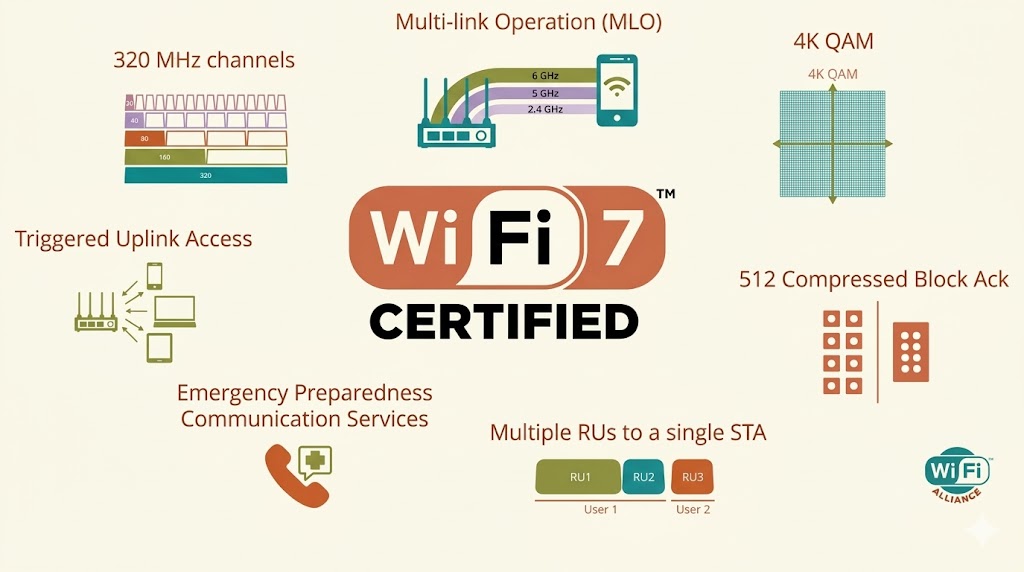
Understanding what actually changed requires going one level deeper than the spec sheet. The three headline features of WiFi 7, Multi-Link Operation, 320 MHz channels, and 4096-QAM modulation, each solve a specific problem. None of them is simply “more of what we already had.” This article explains what each one does, why it matters, and what you should actually expect if you upgrade.
The Three Things That Actually Changed
WiFi standards improve along a few different dimensions that tend to get collapsed into a single “faster” claim in coverage. Speed, latency, reliability under load, and behavior when interference is present are all different things that can improve independently. WiFi 6, for instance, was primarily an efficiency upgrade. It did not dramatically increase peak speeds but it handled dense environments, places with many simultaneous connected devices, significantly better than WiFi 5. That improvement was real and useful even though the headline speed numbers were not that different from what WiFi 5 delivered in practice.
WiFi 7 improves across multiple dimensions simultaneously, which is why the generation is more substantive than the usual cycle. The three core technical changes each target a different part of the problem.
Multi-Link Operation, usually shortened to MLO, changes the fundamental model of how a device connects to a router. Previously, a device picked one band and stayed on it. MLO lets the device use multiple bands at the same time. That is a structural change to how wireless connections work, not an incremental improvement to an existing mechanism.
The 320 MHz channel width doubles the maximum channel size from WiFi 6’s 160 MHz. More channel width means more data can move per unit of time. But the interesting part is not the size increase itself. It is the preamble puncturing feature that comes with it, which allows the router to work around interference within a wide channel rather than abandoning it entirely.
4096-QAM, the modulation upgrade from WiFi 6’s 1024-QAM, squeezes more bits into each transmitted symbol. It is a meaningful efficiency improvement at close range but it has real constraints around signal quality that are worth understanding before you build expectations around it.
Each of these is worth walking through in more detail because the gap between what they sound like and what they actually mean in practice is large enough to affect how you think about upgrading.
MLO: The Feature Nobody Is Explaining Properly
Multi-Link Operation is the WiFi 7 feature that networking engineers get most excited about, and it is also the one that gets the weakest explanations in consumer coverage. Most articles describe it as “using multiple bands simultaneously” and leave it there. That description is technically correct but does not convey what changes as a result.
To understand why MLO matters, you need to understand the problem it solves. A WiFi connection on a single band is vulnerable to conditions on that specific band. If the 5 GHz channel your phone is on becomes congested, or a neighbor’s network causes interference on that frequency, your throughput drops and your latency spikes. Your device cannot automatically shift to a better band mid-connection without dropping and re-establishing the connection, which introduces its own delay. The result is the familiar experience of WiFi that feels fine most of the time and suddenly sluggish for no obvious reason.
MLO addresses this by allowing a device to maintain active connections on multiple bands simultaneously. With MLO, your laptop might be using the 5 GHz and 6 GHz bands at the same time, splitting traffic across both. If one band degrades, traffic shifts toward the better-performing link without dropping the connection. The device and the access point coordinate this automatically. From the user’s perspective it means fewer of those sudden speed drops and latency spikes that happen when a single-band connection hits trouble.
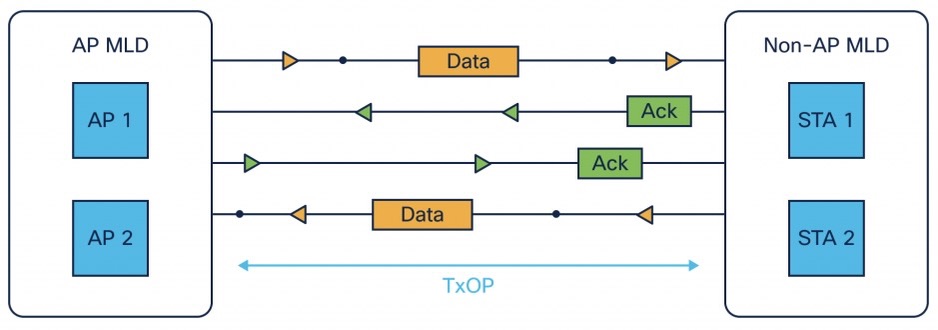
MLO can operate in different modes. The most capable version, which requires a device with separate radio modules for each band, allows simultaneous transmission and reception on all active links. A more modest version, sometimes called enhanced single-radio MLO, splits a 2×2 antenna system into two 1×1 chains operating on different bands, enabling some multi-link functionality with simpler hardware. The performance difference between these modes is significant and is one reason why MLO performance varies across devices even when they all claim WiFi 7 support.
The latency improvement from MLO is also worth understanding separately from the throughput story. WiFi 7 targets sub-1 millisecond latency under good conditions. That matters most for applications where response time is perceptible: online gaming, video calls, AR and VR applications, and any real-time control system. Previous WiFi generations measured typical latency in the range of a few milliseconds under ideal conditions and could spike considerably higher under load. The combination of MLO’s ability to route around congestion and the underlying efficiency improvements in 802.11be brings latency into territory where it genuinely stops being a noticeable factor for most interactive applications.
One practical caveat that does not get enough attention: to get MLO benefits, both the router and the client device need to support it. A WiFi 7 router paired with a WiFi 6 laptop gives you the same single-band connection behavior you have always had for that laptop. MLO only activates when both ends of the connection understand and implement the protocol. As of early 2026, WiFi 7 client support is growing but not yet universal across devices. High-end phones and laptops released in 2024 and 2025 are increasingly shipping with WiFi 7 chipsets. Older devices will not gain the MLO benefit from a router upgrade alone.
320 MHz Channels: More Space, Smarter Use
Channel width in wireless networking is essentially the amount of radio spectrum devoted to a single connection. A wider channel can carry more data simultaneously, the same way a wider road can carry more traffic lanes. WiFi 5 worked with 80 MHz channels as standard, with optional 160 MHz. WiFi 6 supported 160 MHz. WiFi 7 doubles that to 320 MHz, but only in the 6 GHz band where there is enough contiguous spectrum available to make it work.
The 6 GHz band is relatively new to WiFi. WiFi 6E, the extension of WiFi 6, was the first standard to use it. The reason the 6 GHz band matters is that it opened up a large swath of spectrum that had very little existing WiFi traffic on it. The 2.4 GHz and 5 GHz bands are crowded because they have been used for WiFi for decades. Everyone’s router, their neighbors’ routers, and a large number of other devices all compete for space on those bands. The 6 GHz band started relatively empty, which means less interference and more room for wide channels.
A 320 MHz channel in the 6 GHz band is what enables the headline throughput numbers for WiFi 7. The theoretical maximum of 46 Gbps requires 16 spatial streams, which no consumer device supports, but even a 2×2 device using a 320 MHz channel can theoretically reach 5.76 Gbps according to the specification. Real-world performance is lower, but the ceiling for a capable device on a 320 MHz channel is meaningfully higher than on anything WiFi 6 offered.
The constraint is range. Higher frequencies carry less distance and penetrate walls less effectively. The 6 GHz band has shorter range than 5 GHz, which has shorter range than 2.4 GHz. A 320 MHz channel in the 6 GHz band delivers its maximum benefit at close range, within the same room as the access point. As distance increases or walls intervene, the connection either narrows the channel width to maintain the link or steps down to a lower band through MLO. This is not a defect in the standard; it is an inherent physical property of radio waves at higher frequencies. It is just worth knowing that the 320 MHz channel performance applies to a specific physical scenario, not to every device in every room of your home.
4096-QAM: Packing More Into Every Signal
QAM stands for Quadrature Amplitude Modulation. It is a way of encoding information into a radio wave by varying both the amplitude, which is the strength of the signal, and the phase, which is the timing position of the wave relative to a reference. The number before QAM, 4096 in WiFi 7’s case, tells you how many distinct combinations of amplitude and phase the system can represent. Each distinct combination is one symbol. More symbols means more bits of information per symbol.
WiFi 6 used 1024-QAM, which encodes 10 bits per symbol. WiFi 7’s 4096-QAM encodes 12 bits per symbol. That 2-bit increase per symbol translates to a roughly 20 percent improvement in raw data throughput under equivalent conditions, assuming everything else stays the same. That is a real efficiency gain, though more modest than the leap from 256-QAM in WiFi 5 to 1024-QAM in WiFi 6.
The important limitation of 4096-QAM is the signal quality requirement. To reliably distinguish between 4096 different states, the signal needs to be very clean. The signal-to-noise ratio has to be high, which in practice means the device needs to be relatively close to the access point and the RF environment needs to be reasonably interference-free. At longer distances or in noisier environments, the connection will step down to a lower QAM order automatically. The higher QAM rate is what you get under ideal conditions. Under typical home networking conditions, many connections will spend most of their time at lower QAM rates where the modulation is robust enough to handle the signal quality that actually exists.
This is worth understanding not because it makes WiFi 7 bad but because it calibrates expectations correctly. The performance improvement from 4096-QAM is real and meaningful for devices near the access point. It is less significant for devices at the edge of range. For a home or office environment where most devices are within reasonable proximity to the router, the upgrade contributes to overall throughput. For the single device in the basement at the far end of the building, 4096-QAM is not what helps it; MLO and good antenna design are more important there.
Preamble Puncturing: The Interference Fix WiFi Needed
This is the WiFi 7 feature that gets the least consumer coverage and arguably has the most practical day-to-day impact for anyone living in a densely populated area. To understand why, a brief detour into how WiFi handles interference in previous generations is necessary.
WiFi uses wide channels to carry data. When part of a channel is affected by interference from another source, a nearby router on an overlapping frequency for instance, the entire channel becomes unreliable. Previous WiFi generations responded to this by either abandoning the wide channel and dropping to a narrower one that avoided the interference, or by staying on the wide channel and accepting the degraded performance. Neither option is ideal. Dropping to a narrower channel reduces throughput. Staying on a wide channel with interference causes errors and retransmissions that hurt both throughput and latency.
Preamble puncturing changes this. When the router detects interference occupying a portion of the channel, it marks that specific sub-band as punctured and excludes it from the active channel while continuing to use the rest. If you have a 320 MHz channel and interference is hitting a 40 MHz slice of it, preamble puncturing allows the router to essentially carve out that 40 MHz and continue operating on the remaining 280 MHz. You lose some capacity from the affected portion but you keep the rest of the channel functional.
Preamble puncturing is mandatory for WiFi 7 certification, which means every certified WiFi 7 device has to support it. This is significant because it means the feature is not something you get only on premium implementations. Any WiFi 7 router you buy will handle interference with this mechanism. In dense urban environments where the 5 GHz and 6 GHz bands have significant interference from neighboring networks, this feature alone can meaningfully improve the consistency of your connection even if the maximum throughput numbers do not change.
The Honest Numbers: What WiFi 7 Actually Delivers
The 46 Gbps theoretical maximum requires 16 spatial streams, 320 MHz channels, 4096-QAM across all streams, perfect signal conditions, and hardware that does not exist in consumer devices. A more grounded reference point: a 2×2 client device, which is what most laptops and phones are, using a 320 MHz channel with 4096-QAM has a theoretical ceiling of 5.76 Gbps according to the specification. Real-world performance sits considerably below that.
Published real-world benchmarks on WiFi 7 hardware in 2024 and 2025 have generally shown speeds in the range of 3 to 5 Gbps at close range over a clean 6 GHz 320 MHz channel. At typical home distances with walls and floors in the path, speeds drop toward 1 to 2 Gbps on 6 GHz and somewhat lower on 5 GHz. These are still meaningfully faster than what WiFi 6 delivers in equivalent conditions, where close-range benchmarks typically land between 1.5 and 2.5 Gbps, but the gap at distance narrows considerably.
The more useful numbers for most users are not the throughput peaks but the latency improvements and the performance consistency under load. WiFi 7 consistently posts lower latency than WiFi 6 in independent testing, particularly under conditions where multiple devices are active simultaneously. The MLO-enabled ability to route around congestion and the interference handling from preamble puncturing show up in these consistency metrics in ways that raw throughput benchmarks do not capture well.
Quick spec comparison: WiFi 5 theoretical max was 3.5 Gbps. WiFi 6 pushed that to 9.6 Gbps. WiFi 7 goes to 46 Gbps. But real-world close-range speeds tell a more honest story: WiFi 5 delivered around 800 Mbps, WiFi 6 around 1.5 to 2.5 Gbps, and WiFi 7 is landing at 3 to 5 Gbps in clean conditions. The trend is consistent: each generation roughly doubles practical throughput while adding more meaningful improvements in other areas.
How It Compares to WiFi 6 and 6E
| Feature | WiFi 5 (802.11ac) | WiFi 6 / 6E (802.11ax) | WiFi 7 (802.11be) |
|---|---|---|---|
| Theoretical max | 3.5 Gbps | 9.6 Gbps | 46 Gbps |
| Max channel width | 160 MHz | 160 MHz (80 MHz typical) | 320 MHz (6 GHz only) |
| Modulation | 256-QAM | 1024-QAM | 4096-QAM |
| Bands supported | 5 GHz only | 2.4, 5 GHz (6E adds 6 GHz) | 2.4, 5, and 6 GHz simultaneously |
| Multi-band at once? | No | No | Yes (MLO) |
| Interference handling | Basic | Optional puncturing | Mandatory preamble puncturing |
| Target latency | Typically 5 to 20ms | Under 5ms (ideal) | Under 1ms (ideal) |
| Security requirement | WPA2 minimum | WPA3 recommended | WPA3 mandatory for MLO |
| Certified since | 2013 | 2019 (6E: 2021) | January 2024 |
One thing the table does not capture: WiFi 6E and WiFi 7 both use the 6 GHz band, but they use it differently. WiFi 6E devices pick a single 6 GHz channel and stay on it, the same single-band model as all previous WiFi. WiFi 7 devices can use the 6 GHz band as one leg of an MLO connection while simultaneously using 5 GHz or 2.4 GHz. That is a fundamentally more flexible use of the same spectrum. A WiFi 6E router in the 6 GHz band is faster than a WiFi 6 router in 5 GHz, but it is not qualitatively different in how it manages the connection. A WiFi 7 router handling MLO across multiple bands is doing something architecturally different.
Do You Actually Need a WiFi 7 Router Right Now?
This is the question worth spending real time on because the honest answer is more nuanced than most buying guides make it sound.
If your current router is WiFi 6 and you are not experiencing connectivity problems, there is no compelling reason to upgrade today. The performance improvement you would see is real, but it is limited by the fact that most devices you own are probably not WiFi 7 clients. A WiFi 7 router talking to WiFi 6 devices delivers a WiFi 6 connection. The router’s new capabilities do not magically extend to older clients. You get the benefit only as you replace your devices with WiFi 7 hardware over time.
There are specific situations where a WiFi 7 upgrade makes more sense. If you live in a dense apartment building where 5 GHz interference is a constant problem, the combination of wider 6 GHz channels and mandatory preamble puncturing in WiFi 7 routers can improve connection consistency even for WiFi 6 clients on the 5 GHz band, because the router’s interference management is better. If you have several WiFi 7 client devices already, primarily high-end phones and laptops from 2024 and 2025, you will see real performance improvements on those devices specifically. If you are building out a home network from scratch and plan to use it for five or more years, buying WiFi 7 hardware now means the network ages well as WiFi 7 client support becomes ubiquitous.
The price situation in early 2026 is also notably better than at launch. WiFi 7 routers that would have cost several hundred dollars at introduction are now available at more reasonable price points. Budget-tier WiFi 7 options from TP-Link, Asus, and Netgear exist in ranges that are not dramatically different from what a good WiFi 6 router costs. The premium for the new standard has come down enough that for a new purchase, WiFi 7 is often worth choosing over WiFi 6 on a forward-compatibility basis even if you do not have WiFi 7 clients yet.
One thing I would specifically flag: if you are upgrading to WiFi 7, make sure the router you buy supports the full feature set including MLO and 6 GHz operation, not just the 802.11be label. Some budget WiFi 7 products omit the 6 GHz radio or implement limited MLO that does not deliver the full architecture benefits. The 802.11be certification covers a range of implementation levels, so reading the actual spec sheet rather than just the marketing copy matters for understanding what you are actually getting.
For developers, home lab users, and anyone running a lot of simultaneous high-bandwidth workloads: WiFi 7 is genuinely worth it now. The combination of higher throughput and lower latency affects real-world performance on network-intensive tasks in ways that are noticeable. Transferring large files between devices, running multiple 4K streams simultaneously, low-latency remote desktop connections: these all benefit from what WiFi 7 delivers in practice, not just on paper.
Where This Lands
WiFi 7 is a more substantial generational improvement than WiFi 6 was, for reasons that have more to do with the architectural changes in MLO and interference handling than with the headline throughput numbers. The 46 Gbps figure will never show up on your speed test. The lower latency and more consistent connection behavior in congested environments will show up in daily use, particularly on WiFi 7 capable devices.
The honest summary of each major feature: MLO is the genuinely new capability that changes how wireless connections behave rather than just making them faster. It matters most in environments where band-specific interference or congestion is a real problem, which in 2026 describes a lot of dense urban and suburban deployments. Preamble puncturing is the practical improvement that helps the most under typical interference conditions and is present in every certified WiFi 7 router. The 320 MHz channels and 4096-QAM are real improvements but apply at close range under clean signal conditions; they are responsible for the peak benchmark numbers more than for day-to-day improvement for the average device in the average location.
The version of WiFi 7 that matters in practice is not the one running at 5 Gbps to a device sitting next to the router. It is the one that maintains a clean, low-latency connection to your phone in the kitchen while your family’s other devices are all active, handles the interference from your neighbor’s network without dropping to a congested 5 GHz channel, and seamlessly shifts traffic between bands when one of them has a bad moment. That is what the technology is actually solving for, and it does it meaningfully better than anything that came before it.
I upgraded my own home network to WiFi 7 a few months ago, primarily because I was due for a new router anyway and the price gap between WiFi 6 and 7 hardware had narrowed enough to make the choice obvious. The improvement I noticed most was not the benchmark speeds but the consistency. Fewer of those random slow moments that happen when a single-band connection hits interference. It is the kind of improvement that is hard to benchmark but easy to notice in day-to-day use once it is gone.
Are you already running WiFi 7 at home or are you still on 6 or 6E? Curious whether anyone has noticed the MLO benefit in practice, specifically on devices that support it properly. Drop your setup in the comments.
References (March 2026):
Wi-Fi Alliance WiFi 7 certification program (launched January 8, 2024): wi-fi.org/discover-wi-fi/wi-fi-certified-7
IEEE 802.11be-2024 standard (approved September 26, 2024): ieee802.org/11
Cisco Meraki WiFi 7 technical guide (MLO, security, deployment): documentation.meraki.com
Aruba networking WiFi 7 features and benefits (4096-QAM, puncturing, MRU): arubanetworking.hpe.com
Intel WiFi 7 overview and 2×2 client theoretical speeds: intel.com
IEEE ComSoc WiFi 7 backgrounder (January 2025): techblog.comsoc.org
TP-Link WiFi 7 technical specifications: tp-link.com/wifi7
The fastest WiFi in the world is useless if it drops every time a neighbor’s router interferes.
WiFi 7 finally started solving that problem instead of just raising the ceiling.


Leave a Reply