
Table of Contents
- The Most Underrated Piece of Technology You Use Every Day
- What a Barcode Is, Without the Textbook Definition
- From a Beach in Florida to Every Grocery Store on Earth
- What Is Actually Happening During That Half-Second Scan
- The Part Nobody Explains: What Happens After the Beep
- Not All Barcodes Are the Same
- QR Codes Are Barcodes Too, Just Weirder
- 1D vs 2D: When Each One Makes Sense
- Why a 1970s Technology Still Runs Modern Commerce
- The Takeaway
The Most Underrated Piece of Technology You Use Every Day
At some point in the last week, you almost certainly stood in a checkout line and watched a cashier drag products across a glass panel while a series of beeps fired off in rapid succession. It takes maybe two seconds per item. Nobody thinks about it. The receipt comes out, you tap your card, you leave. The whole thing is so routine that the technology behind it has become completely invisible.
That invisibility is, in a weird way, the point. The goal of barcode technology was never to be interesting. It was to make a genuinely tedious and error-prone human task, manually typing product codes and prices into a register, fast enough and reliable enough that it could scale to millions of transactions a day across thousands of stores. It succeeded so completely that we stopped noticing it entirely.
I find that kind of boring-on-purpose engineering more interesting than flashy tech that demands your attention. A lot of the infrastructure that actually keeps modern life running looks exactly like this: simple, unglamorous, decades old, and quietly handling an absurd volume of work every single day. Barcodes are a good example to understand because the underlying concept is elegant and the history of how they got adopted is genuinely entertaining.
What a Barcode Is, Without the Textbook Definition
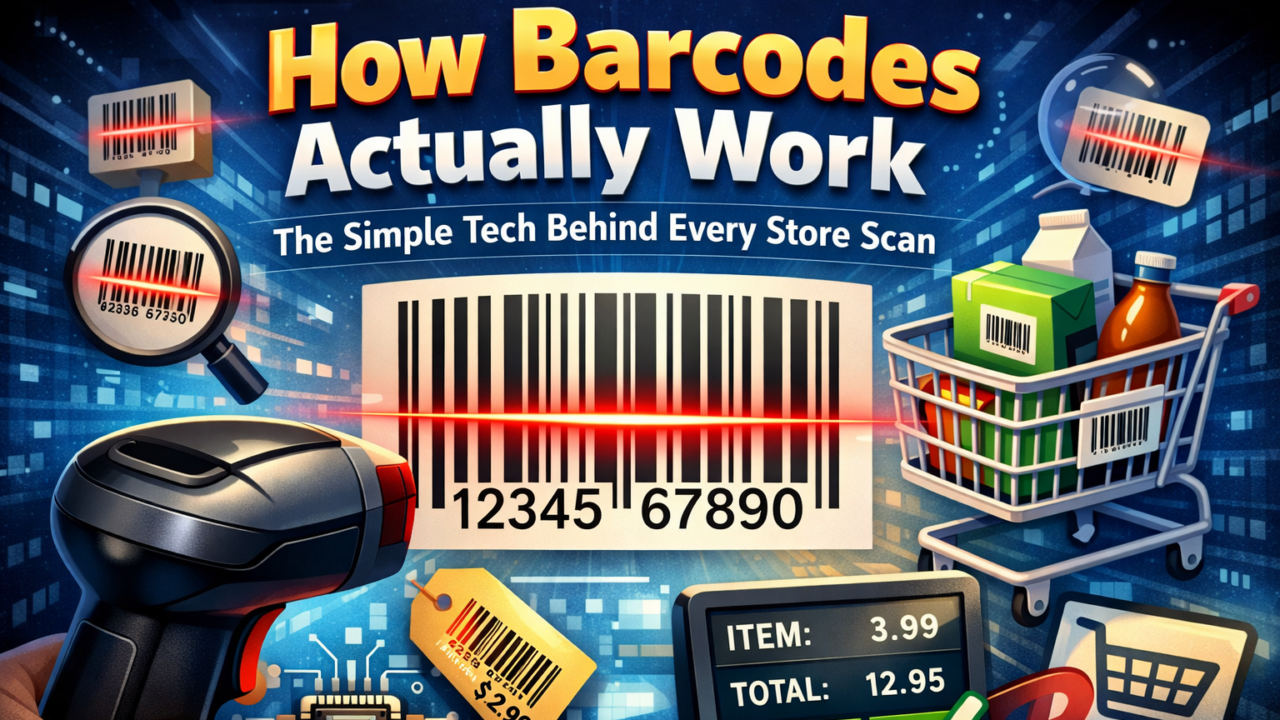
A barcode is a way of encoding numbers, or sometimes letters and numbers, as a pattern that a machine can read with light. The classic version you see on a cereal box is just a series of black bars and white spaces of varying widths. The width of each bar and gap represents specific digits according to a fixed encoding scheme. Scan it with the right light source and sensor, and a computer can reconstruct the number almost instantaneously.
That is really the whole thing. It is not more complicated than that at the concept level. What makes it useful rather than a curiosity is the combination of speed and accuracy. A human typing a 12-digit product code gets it wrong a meaningful percentage of the time. A barcode scanner reading the same code gets it wrong at a rate somewhere around one error in several million scans depending on the type and condition of the code. And the scanner is faster. That combination of speed and reliability is what made the technology worth building an entire global logistics infrastructure around.
The information encoded in a standard retail barcode is typically not the price. This surprises people. It is a product identifier, most commonly a UPC number, that points to a record in a database. The database contains the name, current price, category, and any applicable promotions. The reason for this separation is practical: if a store wants to change the price of something, they update one database record rather than reprinting barcodes on every item in stock.
From a Beach in Florida to Every Grocery Store on Earth
The origin story of barcodes is one of those cases where the actual history is more interesting than the cleaned-up version. In 1948, a grocery chain executive was frustrated by the inefficiency of manual checkout and asked a dean at Drexel Institute of Technology in Philadelphia whether anyone could develop an automatic way to read product information at checkout. A graduate student named Bernard Silver overheard this and mentioned it to a fellow student named Norman Woodland.
Woodland became slightly obsessed with the problem. He eventually left school and moved to Florida, where he spent time thinking about it on the beach. The solution came to him while he was absentmindedly dragging his fingers through the sand: lines of varying widths, inspired by Morse code, which he already knew. He extended the dots and dashes of Morse code into long bars and narrower bars. He later described the moment as genuinely sudden, the kind of realization that comes after a long period of background thinking.
Woodland and Silver filed a patent in 1949 and received it in 1952. Then nothing useful happened for about two decades. The idea was correct but the technology to implement it reliably and cheaply did not exist yet. Early attempts required bulky, expensive equipment that was impractical for retail environments. The patent was eventually bought by RCA and the concept sat in development limbo while the industry slowly worked out how to make it work at scale.
The moment that actually changed everything happened on June 26, 1974, at a Marsh supermarket in Troy, Ohio. A cashier named Sharon Buchanan scanned a pack of Wrigley’s Juicy Fruit chewing gum at 8:01 in the morning. It was the first commercial use of a barcode at retail checkout, using the new Universal Product Code standard that a coalition of food industry companies had agreed on the previous year. That pack of gum is now in the Smithsonian. The UPC it carried is the same 12-digit format used on almost every retail product in North America today.
Fun fact: The exact pack of Wrigley’s Juicy Fruit from that first scan is on permanent display at the Smithsonian’s National Museum of American History in Washington D.C. It cost 67 cents. The original register receipt is there too. A 10-pack of gum became the artifact that marked the moment global commerce changed forever.
Adoption after that was not instant. Retailers needed to install scanners. Manufacturers needed to start printing barcodes on packaging. The infrastructure required coordination across an entire industry and took most of the 1970s to reach critical mass. By the mid-1980s, barcodes were standard in grocery stores. By the 1990s, they had spread through retail broadly and into logistics, healthcare, libraries, and manufacturing.
What Is Actually Happening During That Half-Second Scan
Modern barcode scanners fall into two main categories that work differently enough to be worth distinguishing. Laser scanners, the kind with the bright red line, work by firing a laser beam across the barcode while a rotating mirror sweeps it back and forth rapidly. The beam hits the barcode, black bars absorb the light, white spaces reflect it back, and a photodetector converts the fluctuating reflectance into an electrical signal that looks like a waveform. Peaks in the waveform represent the white spaces, valleys represent the black bars, and the width of each peak and valley encodes the digit.
Image-based scanners, which includes essentially every smartphone camera being used as a scanner, work differently. They capture a photograph of the barcode, then software analyzes the image to find the pattern and decode it. This approach is slower in theory but more flexible in practice because software can handle imperfect scans, angled codes, and damaged barcodes by using the image intelligently. It is also why QR codes can be scanned from any orientation while traditional laser scanners require you to hold the barcode at roughly the right angle to the beam.
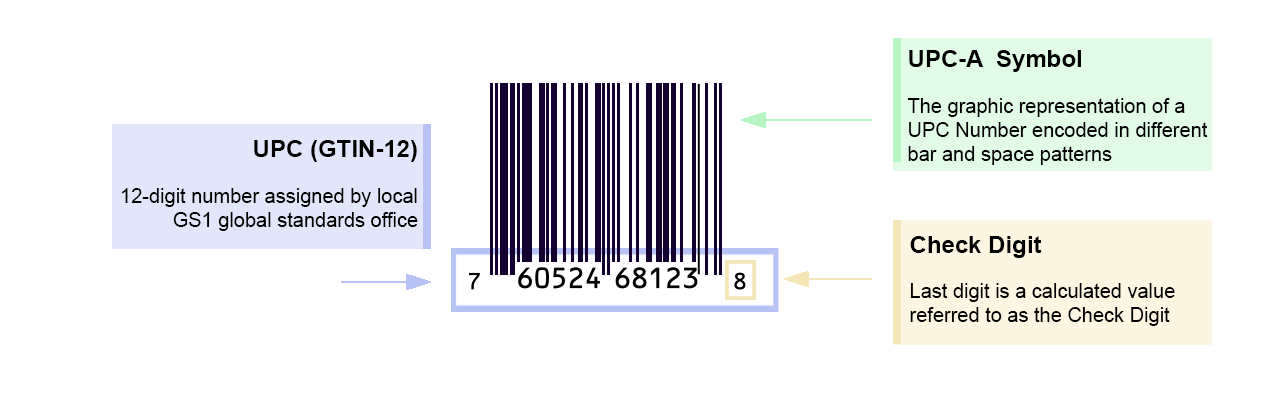
The decoding step is where the symbology matters. Each barcode format, UPC, Code 128, EAN-13, and others, has its own encoding scheme that specifies exactly what each pattern of bars and spaces means. The scanner’s firmware knows these specifications and uses them to translate the waveform or image into the underlying number. There are also check digit calculations built into most barcode standards, where the last digit of the number is mathematically derived from the others, so the scanner can verify that what it read is internally consistent before accepting it as valid. That check digit is part of why error rates are so low.
The Part Nobody Explains: What Happens After the Beep
The scanner has done its job at the beep. It has decoded the pattern and handed off a number, say 012345678905, to the point-of-sale system. What happens next is entirely a database and software problem rather than an optics or physics problem, but it is worth understanding because the separation between “reading the code” and “knowing what the code means” is a deliberate design choice with real consequences.
The POS system takes that number and queries a product database, either local or networked, that contains records mapping each product ID to its name, current price, tax category, applicable promotions, and whatever other metadata the store maintains. The result comes back and gets displayed on the screen: Coke Zero 500ml, $1.89, or whatever it is. Simultaneously, inventory systems record that one unit of this product was sold, which feeds into automatic reorder systems and supply chain management at larger retailers.
The fact that the barcode holds only an identifier rather than the actual product information is what enables centralized price management. A retailer running two hundred stores can change the price of a product across every location by updating a single database record. Without this architecture, price changes would require either manual updates at every register or reprinting barcodes on the physical products. Neither is practical at scale.
In logistics and warehousing the same principle applies but the database records contain different information: package contents, origin, destination, handling instructions, chain of custody records. Every scan adds a timestamp and location to the package’s history, which is how shipping providers can tell you that your package was in a sorting facility in Memphis at 3am and departed by truck at 6am. That level of tracking was essentially impossible before barcodes and is now considered a basic expectation.
Not All Barcodes Are the Same
Most people only ever think about the UPC code on retail products, but there are dozens of barcode formats optimized for different uses. A few are worth knowing.
UPC-A is the 12-digit standard you see on almost every product sold in North America. EAN-13 is the international equivalent with 13 digits, the extra digit being a country prefix. They are functionally the same technology and most modern scanners read both without distinguishing between them. The two standards were unified under the GS1 organization in 2005, which is why a European product can be scanned at an American checkout without any special configuration.
Code 128 handles both numbers and letters, which makes it more flexible for applications where product codes include alphabetic characters. You see it on shipping labels, hospital wristbands, and library books. It can encode the full ASCII character set and is significantly more dense than UPC, meaning it can pack more information into the same physical space on the label.
Data Matrix is a 2D format that looks like a small square of dots rather than lines. It is used heavily in electronics manufacturing and pharmaceuticals where space is extremely limited. You can encode meaningful amounts of information in a code the size of a pencil eraser, which is useful when you are trying to mark an individual electronic component for traceability.
QR Codes Are Barcodes Too, Just Weirder
QR codes get treated as a separate category in most consumer conversations but they are just a specific type of 2D barcode. A Japanese company called Denso Wave developed them in 1994 to track automotive components moving through Toyota’s manufacturing facilities. The QR stands for Quick Response, which was a reference to being readable from any angle without requiring alignment, unlike the linear barcodes used on the factory floor at the time.
The key technical difference from a traditional 1D barcode is that QR codes encode data in two dimensions rather than one. Where a standard barcode stores data in horizontal variation only, a QR code stores data both horizontally and vertically in the grid pattern. This is why QR codes can hold orders of magnitude more information than a UPC. A standard UPC holds 12 digits. A QR code can hold up to around 7,000 digits, or around 4,000 alphanumeric characters, or about 2,500 bytes of binary data depending on the error correction level configured.
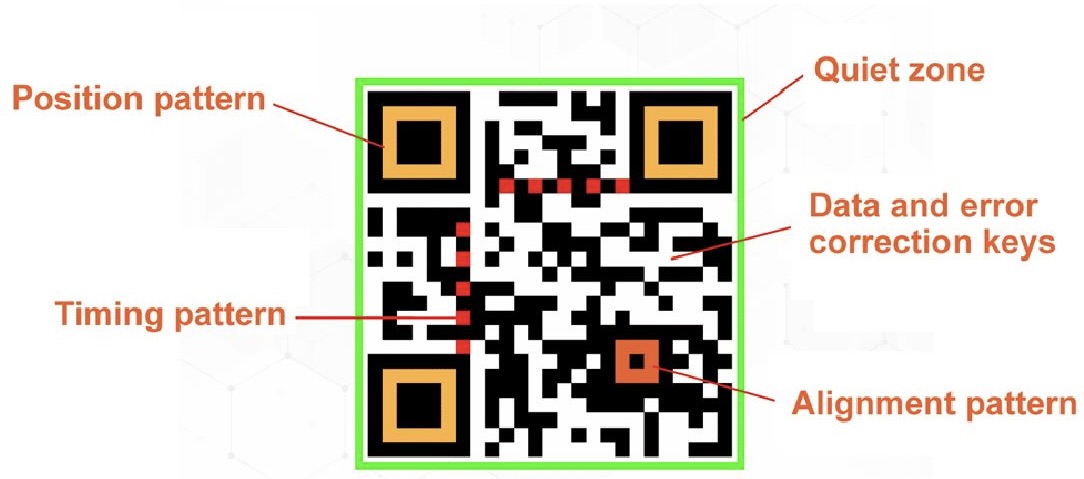
The three large square patterns in the corners of every QR code are position detection markers. They allow the scanner to identify the orientation and boundaries of the code regardless of which direction it is being held. This is what makes QR codes scannable from any angle, unlike a 1D barcode which requires rough alignment with the scan direction. QR codes also have error correction built in at a level that allows them to be read even when up to 30 percent of the code is damaged or obscured, which is why you can put a logo in the middle of a QR code and it still works.
The reason QR codes exploded in consumer use between 2020 and now has less to do with any technical improvement to the format itself and more to do with the fact that smartphone cameras became capable of reading them natively without a separate app. Once iPhones started automatically recognizing QR codes in the camera viewfinder in iOS 11, the friction of using them dropped enough that restaurants, event organizers, and advertisers found them worth including. The technology had been around for 25 years before the adoption took off.
I still remember scanning a restaurant menu QR code for the first time in 2022 and genuinely being surprised that my phone just opened the menu instantly without downloading anything. It felt like it should have been more complicated than that. Once you know how it works it makes complete sense, but the first time it is weirdly satisfying. That reaction is probably part of why QR codes caught on with consumers the way they did once the friction was removed.
1D vs 2D: When Each One Makes Sense
| Feature | 1D Barcode (UPC, EAN, Code 128) | 2D Barcode (QR, Data Matrix) |
|---|---|---|
| Data capacity | 10 to 48 characters typically | Hundreds to thousands of characters |
| What it stores | An identifier that points to a database record | Actual data: URLs, contact info, WiFi credentials, text |
| Scan requirements | Needs rough alignment with scan direction | Any angle, readable even when partially damaged |
| Scanner needed | Laser scanner or camera | Camera only (any modern smartphone) |
| Where you see it in 2026 | Retail checkout, shipping labels, inventory, hospital wristbands | Restaurant menus, event tickets, payments, marketing materials |
| Works without a database? | No, the code is just an ID that needs a lookup | Yes, the data is self-contained in the code itself |
| Error correction | Check digit only | Up to 30% of code can be damaged and still read |
Why a 1970s Technology Still Runs Modern Commerce
There is a reasonable question buried somewhere in all of this, which is why we are still using barcodes in 2026 rather than something more sophisticated. RFID tags, for instance, can be read without line of sight, can be scanned in bulk without scanning each item individually, and can hold more data. NFC is built into every modern smartphone. Computer vision has gotten good enough that some stores are experimenting with cameras that identify products without any label at all. All of these technologies exist and work.
The answer is a combination of cost, reliability, and installed base. A barcode label costs fractions of a cent to print and requires no battery or electronics. An RFID tag capable of the same tracking costs significantly more and requires RF readers rather than simple optical scanners. For a retailer applying labels to millions of products a week, the cost difference is not trivial. For a manufacturer deciding what to put on a product that will be sold through a supply chain involving hundreds of different retailers, each with their own scanning infrastructure, defaulting to the format that every scanner in the world can already read is the obvious decision.
The global standardization of UPC and EAN under GS1 also created an infrastructure lock-in that is genuinely hard to displace. Every cash register, every warehouse scanner, every inventory system, every logistics platform on earth speaks barcode natively. Getting the entire global retail and logistics industry to simultaneously adopt a new system would require a coordination effort that is essentially unprecedented. RFID has been “about to replace barcodes” in industry predictions for at least fifteen years and has not, precisely because the migration cost for any single actor is hard to justify when the current system works fine.
What has actually happened instead is that barcodes and newer technologies coexist in specialized niches. High-end retail uses RFID for inventory management internally while still using barcodes at the customer-facing checkout. Pharmaceuticals use both 1D and 2D codes on packaging for different regulatory purposes. Warehouses use a mix of barcode and RFID depending on what they are tracking and at what cost point. The barcode did not lose to better technology. It got absorbed into a hybrid ecosystem where it still does the parts it was always best at.
The Takeaway
Barcodes are worth understanding not because they are technologically impressive by current standards, they are not, but because they are a case study in what it looks like when a technology solves a real problem well enough to become invisible infrastructure. The fact that you do not think about them is the proof that they worked.
The core idea, encode information as a pattern of light and dark that a machine can read faster and more reliably than a human, turns out to generalize broadly. QR codes apply it to arbitrary data. Data Matrix applies it to tiny labels on electronics. The pharmaceutical industry uses it to track individual doses through the supply chain. The underlying concept from Norman Woodland’s moment on a Florida beach in the late 1940s is still running in essentially every industry that moves physical objects.
If you want to actually get a feel for how this works rather than just reading about it, generating a QR code is free and takes thirty seconds. Any of the major QR generators online will let you encode a URL or a piece of text and download the resulting image. I did this last week with a link to my Spotify playlist, took about ten seconds, and it worked perfectly the first time I scanned it. Scan it with your phone camera and watch it decode. Then try covering parts of it with your finger and scanning again. You will find you can cover a surprising amount of the code before the camera fails to read it, which is the error correction working in a way that is more convincing when you experience it than when someone describes it to you.
What is the most unexpected place you have seen a barcode or QR code used? I am genuinely curious because the range of applications for this technology is wider than most people realize until they start noticing them.
References (March 2026):
GS1 UPC and EAN barcode standards: gs1.org/standards/barcodes
Denso Wave QR code history and technical specification: qrcode.com
First UPC scan, June 26, 1974, Marsh Supermarket: Smithsonian National Museum of American History
Woodland and Silver patent history: United States Patent 2,612,994 (1952)
ISO/IEC 18004:2015 QR code specification
Scandit barcode scanning technical documentation: scandit.com
Fifty years of beeps, billions of scans a day, and nobody ever stops to think about it.
That is probably the best thing a technology can aspire to.




Leave a Reply